
GTS Menu Control Advanced WordPress menu visibility, targeting, scheduling, and placement control.
Premium WordPress Menu Control Plugin

Take Full Control of Your WordPress Navigation

Show, hide, replace, schedule, and reposition menus by page, role, device, and timing — all from one clean interface built for developers, freelancers, and agencies.
Role-based visibility Page-level targeting Sticky menu support Theme menu replacement
Secure checkout Instant access License-based updates 7-day refund policy
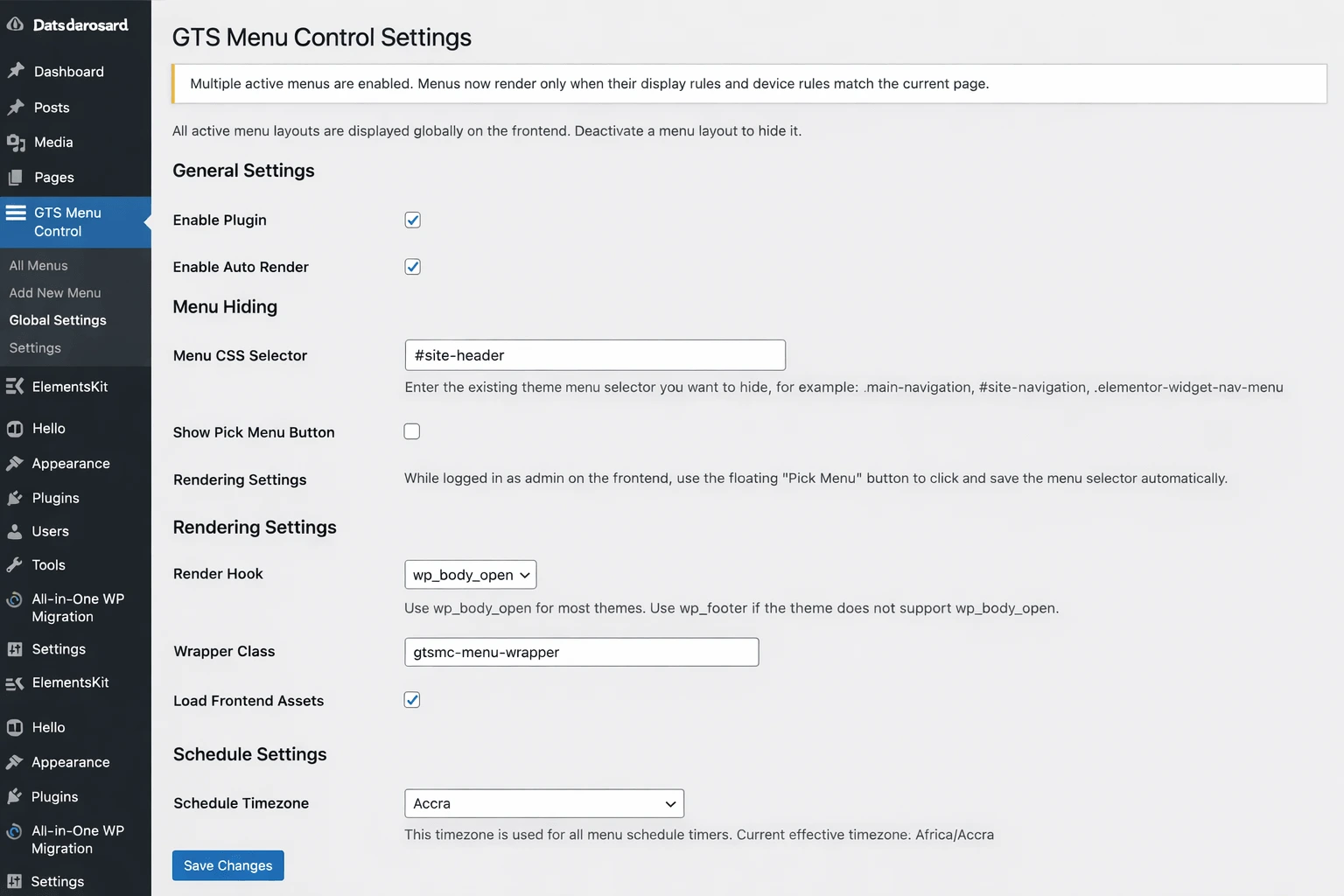
GTS Menu Control dashboard screenshot
Device Targeting Desktop / Tablet / Mobile
User Visibility Guests / Logged-in / Roles
Built for developers
Elementor-friendly workflows
Flexible theme integration
Designed for agencies
Product Highlights

Everything You Need to Control Menu Behavior

One plugin for dynamic WordPress navigation, visibility logic, theme menu handling, and campaign-ready scheduling.

🎯

Display Rules

Target menus by pages, posts, categories, tags, and custom logic.

👤

User Conditions

Show different menus to guests, logged-in users, and selected roles.

📱

Device Visibility

Set menu behavior independently for desktop, tablet, and mobile.

🔁

Theme Menu Control

Hide, replace, or render menus before or after the theme menu.

See It In Action

Built to Solve Real Menu Problems Fast

GTS Menu Control helps you show the right menu to the right users, on the right pages, at the right time — without touching theme files.

GTS Menu Control live admin interface preview

From simple visibility rules to advanced menu placement

Whether you are building for a client, a WooCommerce store, a membership area, or a role-based dashboard, you can manage complex menu logic from one clean panel.

  • Show a different menu for guests and logged-in users
  • Target specific pages, posts, categories, or custom conditions
  • Hide or replace your theme menu without editing code
  • Control menu visibility by desktop, tablet, and mobile
  • Schedule temporary menus for launches, campaigns, or events
Without GTS Menu Control

Default WordPress navigation feels limited.

  • Same menu shown to everyone
  • No clean scheduling workflow
  • No proper mobile targeting
  • Theme-specific menu limitations
  • Advanced logic often needs code
With GTS Menu Control

Build smarter, rule-based menu experiences.

  • Show menus by audience and page context
  • Run temporary menus for campaigns or launches
  • Control placement before or after theme menus
  • Use sticky menus for better UX
  • Manage complex menu behavior from one interface
Use Cases

Made for Real WordPress Workflows

Perfect for freelancers, agencies, WooCommerce sites, membership projects, and advanced client builds.

Guest vs Logged-in Menus

Show a different navigation experience to visitors and authenticated users.

Mobile-Specific Menus

Hide or display menus differently across desktop, tablet, and mobile layouts.

Campaign Navigation

Schedule menus for sales, launches, festive promotions, and temporary events.

Role-Based Dashboards

Display different menu sets for admins, vendors, customers, or members.

Conditional Theme Replacement

Replace the theme menu only where you need it, not across the whole site.

Agency Client Builds

Deliver custom navigation logic faster without repetitive custom coding.

Compatibility

Works smoothly with the tools WordPress users already rely on

GTS Menu Control is designed for real-world WordPress builds where themes, page builders, user roles, and device-specific experiences all need to work together.

Elementor-Friendly
WooCommerce Projects
Role-Based Sites
Custom Theme Workflows
Why Buyers Feel Safe

Built for developers, practical for freelancers, flexible for agencies

Instead of forcing you into one rigid menu system, the plugin gives you clean targeting, better placement control, and easier client-ready menu management.

  • No need to hardcode menu logic into theme templates
  • Cleaner workflow for temporary campaigns and visibility rules
  • Useful for client sites with multiple audiences or menus
  • Great fit for stores, members-only areas, and dynamic navigation
Feature Groups

Advanced Features, Organized Clearly

Built to stay easy for site owners and powerful enough for developers.

Visibility Engine

  • Pages, posts, categories, tags
  • Include / exclude logic
  • Conditional display rules

Audience Targeting

  • Guest / logged-in user visibility
  • User role targeting
  • Flexible display control

Device & UX

  • Desktop / tablet / mobile visibility
  • Sticky menu behavior
  • Better responsive navigation control

Theme Integration

  • Hide theme menu via selector
  • Replace menu conditionally
  • Render before or after theme menu

Scheduling

  • Date-based rules
  • Time-based display
  • Temporary campaign menus

Developer-Friendly

  • Clean admin workflow
  • Flexible logic for complex sites
  • Great for agencies and client projects
💸
7-Day Money-Back Guarantee Try it on a real project with less purchase hesitation.
Instant Access After Purchase Buy, download, activate, and start building right away.
🧩
Made for Modern Themes Flexible enough for Elementor workflows and custom theme setups.
Ready to Use It?

Stop fighting theme limitations and control your menus properly

Get one plugin for menu targeting, role-based visibility, device rules, scheduling, sticky behavior, and theme menu placement — all in one workflow.

Pricing

Choose the License That Fits Your Workflow

Secure checkout via Freemius. Switch between annual and lifetime pricing.

Single Site

Personal

$19.99/yr
$49.99one-time

Best for one website or a single client project.

  • All Pro features included
  • 7-day money-back guarantee
  • License-based updates via Freemius
100 Sites

Agency

$79.99/yr
$149.99one-time

Built for agencies and teams with a larger site portfolio.

  • All Pro features included
  • 7-day money-back guarantee
  • License-based updates via Freemius
Secure checkout via Freemius Instant access after purchase 7-day refund policy
FAQ

Frequently Asked Questions

Premium-style accordion with animation. Click to expand.

Right after a successful purchase, you will receive your license details and purchase confirmation through Freemius. You can then download the plugin and activate your license on your WordPress site.
Yes. Once your license is activated inside WordPress, you will receive authenticated plugin updates through Freemius for the duration of your active license.
Yes. You can upgrade from a smaller license to a larger one later if you need to use GTS Menu Control on more websites.
GTS Menu Control comes with a 7-day money-back guarantee. If the plugin is not the right fit for your project, you can request a refund within that period.
Yes. GTS Menu Control is designed to work with most modern WordPress themes. If your theme uses a custom navigation structure, you can use the selector-based menu hiding option for better control.
Yes. It works well with Elementor and most page builders, so you can control menu visibility without disrupting your page design workflow.
Yes. You can display different menus based on user roles and logged-in status, which is useful for customers, members, vendors, admins, or private sections of your website.
Yes. You can schedule menus to appear or disappear based on your selected date and time settings, which is ideal for promotions, seasonal offers, launches, or temporary navigation changes.
No. Most features can be configured directly from the plugin settings and menu layout screens. Advanced users can also use CSS selectors for more precise control when needed.
You can usually continue using the version already installed, but you will lose access to future updates, new features, and support after your license expires.
Yes. GTS Menu Control supports hiding the existing theme menu and rendering your custom menu based on your rules, placement settings, and display conditions.
Ready to Start?

Control Your WordPress Menus Like a Pro

Get flexible menu targeting, device visibility, scheduling, theme integration, and premium workflows in one plugin.